
OmniRoute — Dashboard Features Gallery
Visual guide to every section of the OmniRoute dashboard.
📅 Last updated: 2026-06-28 — v3.8.40
✨ v3.8.0 Highlights
Section titled “✨ v3.8.0 Highlights”The v3.7.x → v3.8.0 cycle added zero-config auto routing, new providers, OAuth flows, deeper resilience, and a much richer CLI experience. Headline features below — full details further in the document and in linked specs.
- 🤖 Auto Combo / Zero-config auto-routing — use prefixes
auto/coding,auto/fast,auto/cheap,auto/offline,auto/smart,auto/lkgp,auto/chaos. Backed by a 16-factor scoring engine and 6 curated mode packs (ship-fast, cost-saver, quality-first, offline-friendly, reliability-first, chaos-mode) - 🆕 Command Code provider (#2199) — first-class registration with model catalog and quota tracking
- 🆕 Z.AI provider — new free-tier provider with quota labels
- 🎬 KIE media expansion — extended catalog including video generation models
- 🔐 Devin authentication — Desktop imports an existing Devin API key; the CLI uses local
devin auth logincredentials - 🆓 8 new free providers — LLM7, Lepton, UncloseAI, BazaarLink, Completions, Enally, FreeTheAi, Command Code
- 🎯 Manifest-aware tier routing W1–W4 — provider manifests drive weighted tier selection
- 🎨 Cursor full OpenAI parity — tool calls, streaming, session management end-to-end
- 📊 Cursor Pro plan usage — quota & cycle data surfaced in the provider-limits dashboard
- ⚡ Service tier breakdown / Codex fast tier analytics — per-tier consumption visibility
- 📌 Per-session sticky routing — Codex sessions pin to the same account between turns
- 🔊 Inworld TTS enhancements — voice catalogs, streaming, and latency improvements
- 🔑 Kiro headless auth — login via local
kiro-cliSQLite store, no browser required - 📉 DeepSeek quota and limit monitoring — daily/monthly usage exposed via dashboard
- 🔄 Reset-aware routing strategy — combos now prefer accounts whose quota window resets soonest
- ⏱️
fallbackDelayMsand dynamic tool limit detection — finer fallback timing + per-provider tool-count limits - 🔧 Background mode degradation (Responses API) — falls back to synchronous mode with a structured warning when an upstream lacks background polling
- 🚦 Per-provider 429 classification +
useUpstream429BreakerHintstoggle — finer breaker behavior using upstream rate-limit hints - 🩺 Model cooldowns dashboard — observe per-model lockouts and manually re-enable from the UI
- 🔒 MITM dynamic Linux cert detection — works across Debian/Ubuntu, Fedora/RHEL, Arch, and other distros
- 💻 CLI enhancement suite — 20+ commands including
omniroute providers,omniroute combos,omniroute doctor,omniroute setup - 🔍 Qdrant embedding model discovery — automatic vector-store model probe
- 🔑 API Keys / Bearer keys with
managescope — perform admin operations programmatically via API - 🏥 Combo target health analytics + structured combo builder — per-target health & UI builder for assembling
(provider, model, connection)steps - 🤝 GitLab Duo OAuth provider — login with GitLab credentials
- 🧠 Reasoning Replay Cache — hybrid in-memory + SQLite persistence of reasoning traces
📚 Related docs: Skills Framework · Memory System · Cloud Agents · Webhooks · Reasoning Replay Cache
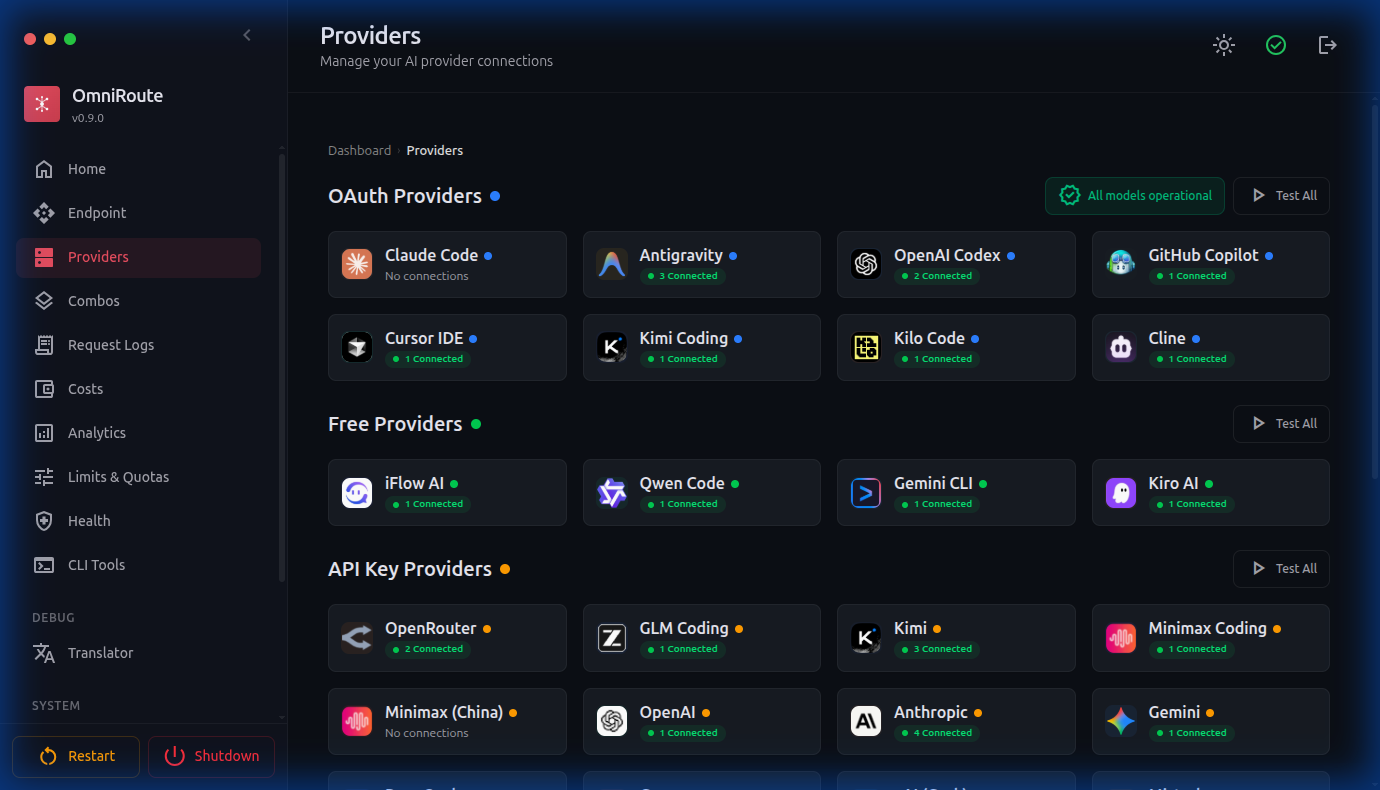
🔌 Providers
Section titled “🔌 Providers”Manage AI provider connections: OAuth providers (Claude Code, Codex), API key providers (Groq, DeepSeek, OpenRouter), and free providers (Qoder, Kiro). Kiro accounts include credit balance tracking — remaining credits, total allowance, and renewal date visible in Dashboard → Usage.
OpenRouter connections can store a per-connection preset in Advanced Settings. When set, OmniRoute sends it as the OpenRouter top-level request field, for example "preset": "email-copywriter", unless the client request already supplied its own preset.
🎨 Combos
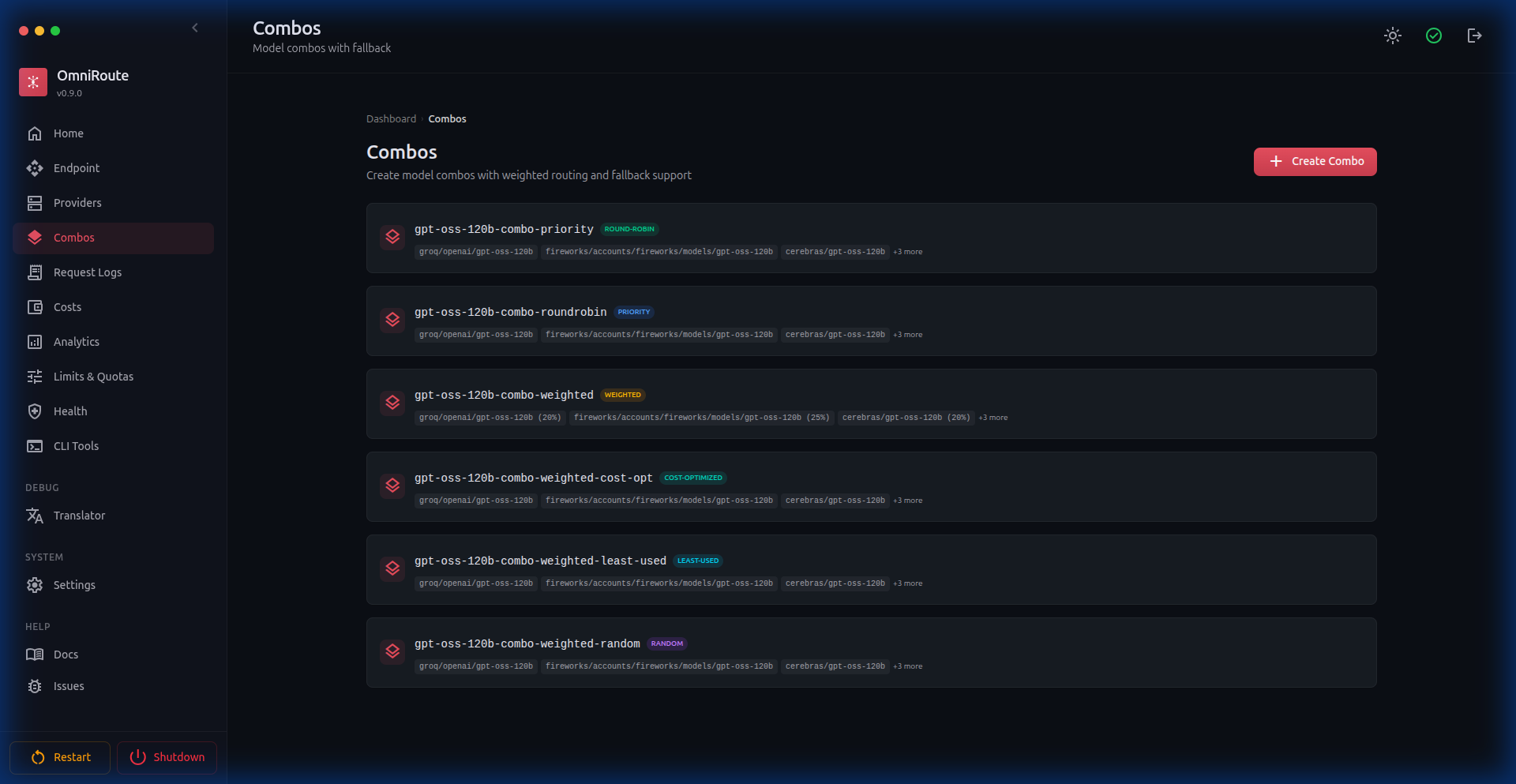
Section titled “🎨 Combos”Create model routing combos with 19 public strategies: priority, weighted, round-robin, context-relay, fill-first, p2c (power-of-two choices), random, least-used, cost-optimized, reset-aware, reset-window, headroom, strict-random, auto, lkgp (last-known-good-provider), context-optimized, cache-optimized, fusion (fan out to a panel of models in parallel, then synthesize one answer via a judge), and pipeline. Each combo chains multiple models with automatic fallback and includes quick templates and readiness checks.
Recent combo improvements:
- Structured combo builder — create each step by selecting provider, model, and exact account/connection
- Repeated provider support — reuse the same provider many times in one combo as long as the
(provider, model, connection)tuple is unique - Combo target health — analytics and health surfaces now distinguish individual combo targets/steps instead of collapsing everything into model strings
- Composite tier ordering —
defaultTier -> fallbackTiernow influences runtime execution/fallback order for top-level combo steps - System prompt templates — combo
system_messagesupports server-side{{MODEL_ID}},{{PROVIDER_ID}},{{ACCOUNT}}and{{FINGERPRINT}}placeholders, expanded from the actually-routed target right before dispatch. Allowlisted and non-recursive; unknown placeholders stay literal; empty values expand to empty; client system prompts are never rewritten.{{FINGERPRINT}}resolves only for fingerprint-based free providers with a pinned or auto-rotated fingerprint — it expands to empty elsewhere (e.g. single-fingerprint connections, non-fp providers). Expansion covers the standard dispatch loop, round-robin, and pinned context-cache sessions; fusion, chaos, pipeline and nested-execute strategies do not expand placeholders yet.
📊 Analytics
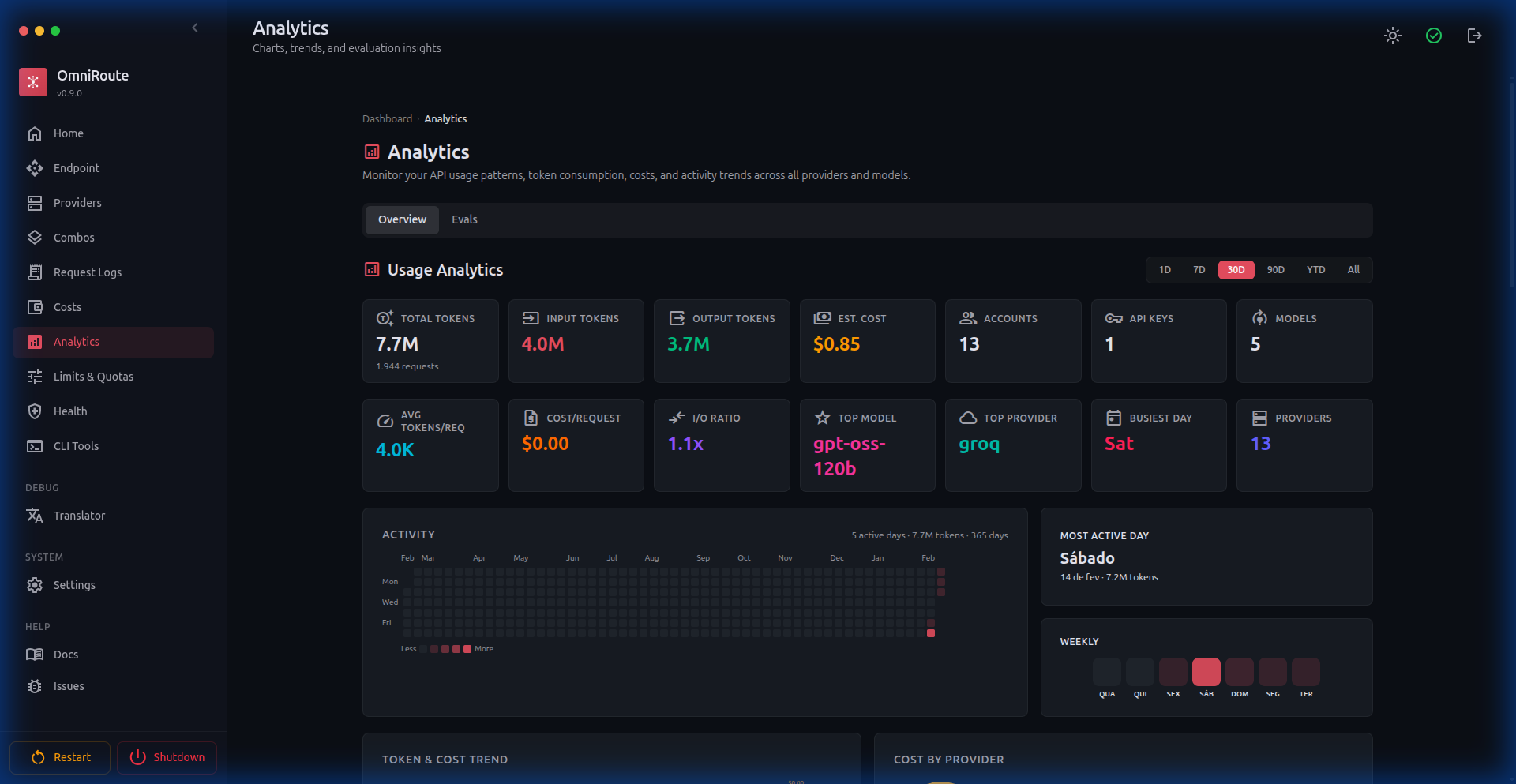
Section titled “📊 Analytics”Comprehensive usage analytics with token consumption, cost estimates, activity heatmaps, weekly distribution charts, and per-provider breakdowns.
🏥 System Health
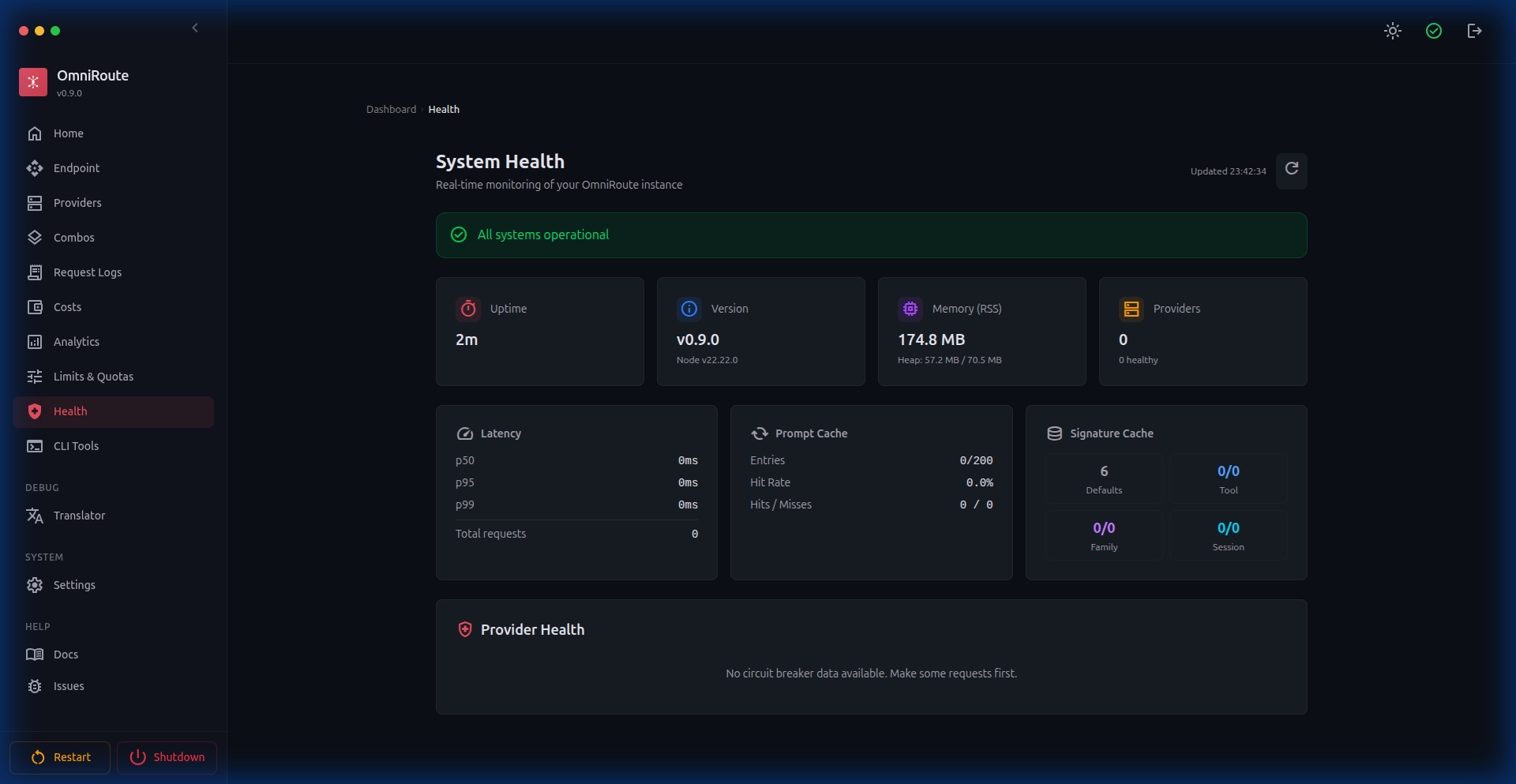
Section titled “🏥 System Health”Real-time monitoring: uptime, memory, version, latency percentiles (p50/p95/p99), cache statistics, provider circuit breaker states, active quota-monitored sessions, and combo target health.
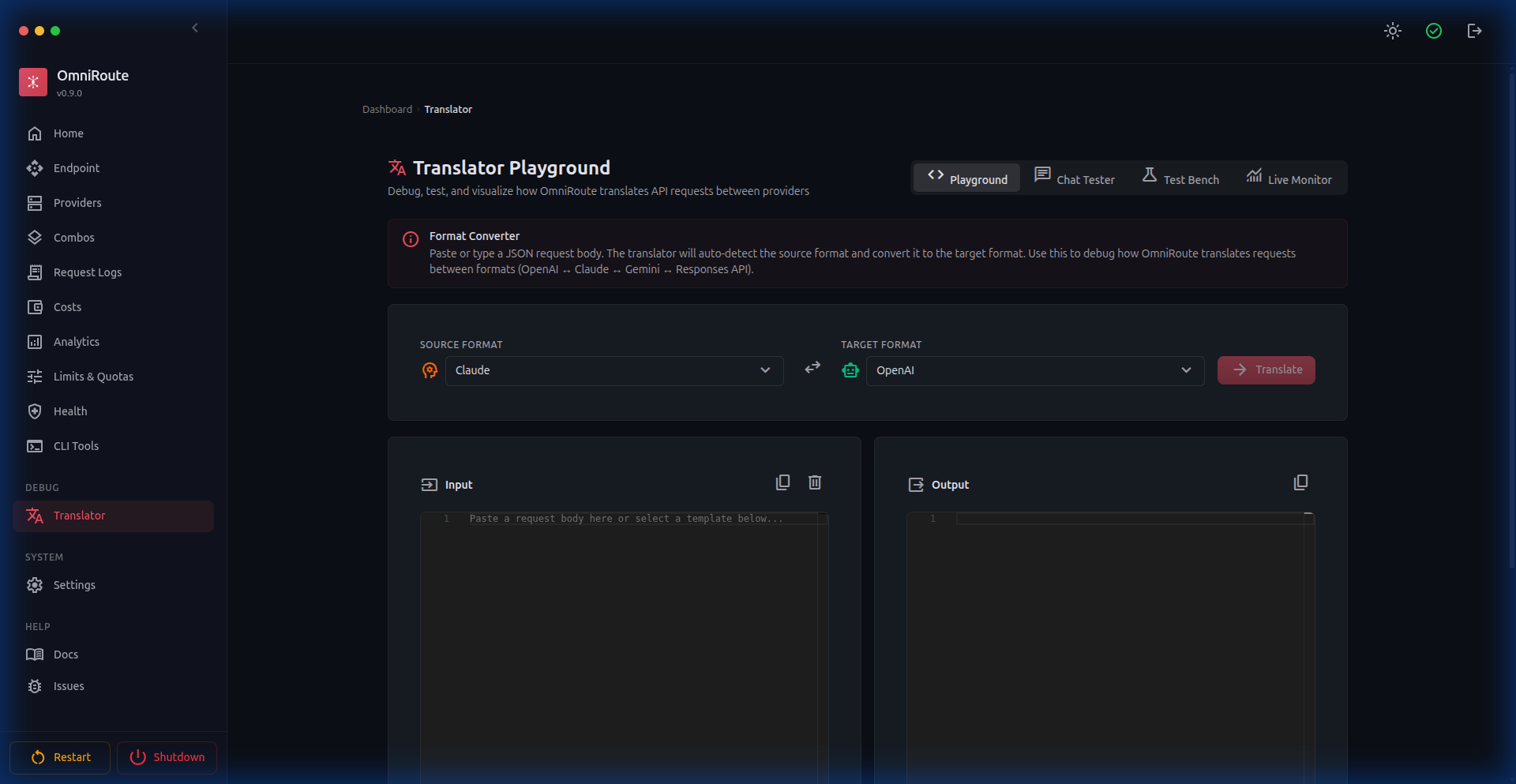
🔧 Translator Playground
Section titled “🔧 Translator Playground”Four modes for debugging API translations: Playground (format converter), Chat Tester (live requests), Test Bench (batch tests), and Live Monitor (real-time stream).
🎮 Model Playground (v2.0.9+)
Section titled “🎮 Model Playground (v2.0.9+)”Test any model directly from the dashboard. Select provider, model, and endpoint, write prompts with Monaco Editor, stream responses in real-time, abort mid-stream, and view timing metrics.
🎨 Themes (v2.0.5+)
Section titled “🎨 Themes (v2.0.5+)”Customizable color themes for the entire dashboard. Choose from 7 preset colors (Coral, Blue, Red, Green, Violet, Orange, Cyan) or create a custom theme by picking any hex color. Supports light, dark, and system mode.
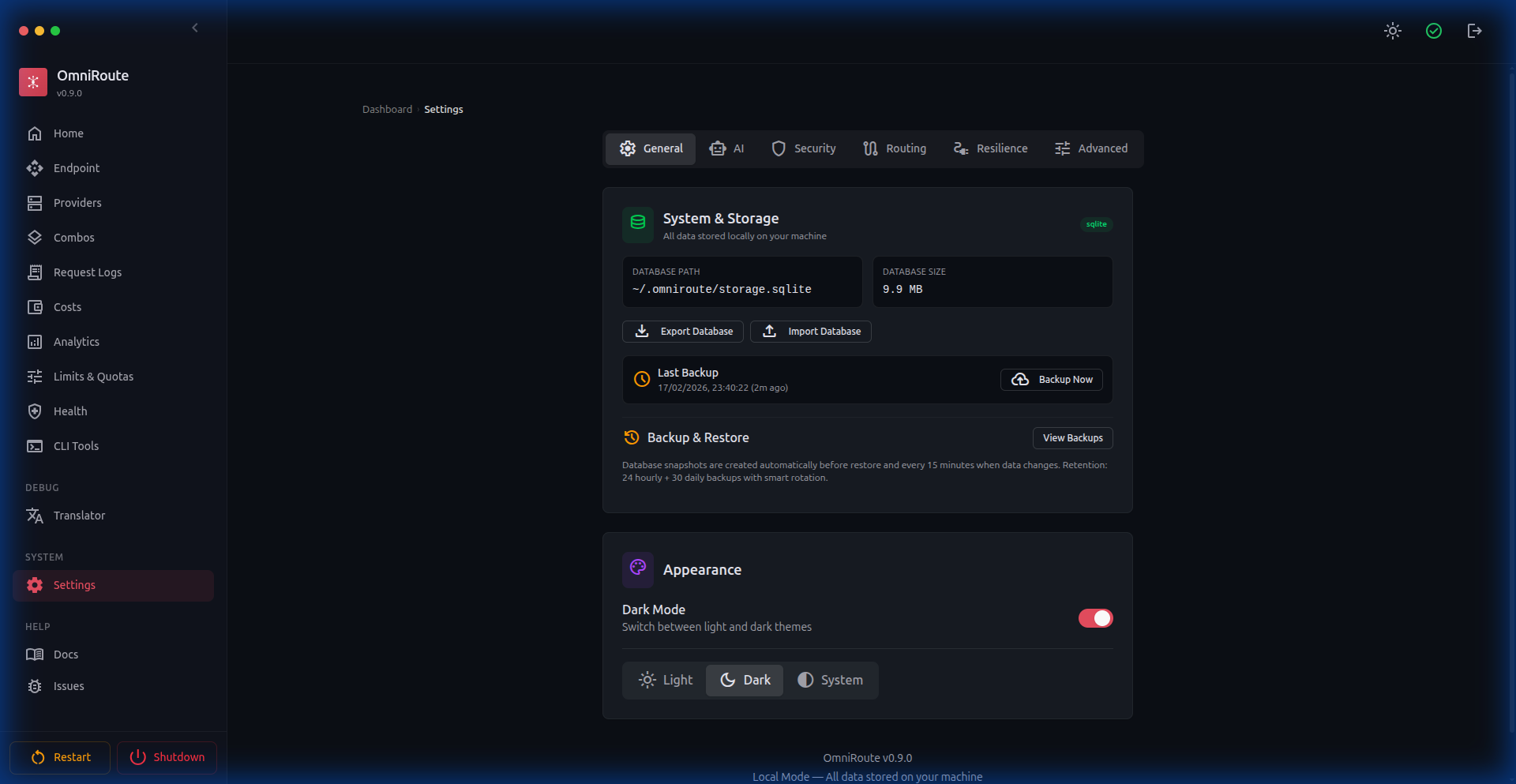
⚙️ Settings
Section titled “⚙️ Settings”Comprehensive settings panel with 7 tabs:
- General — System storage, backup management (export/import database)
- Appearance — Theme selector (dark/light/system), color theme presets and custom colors, health log visibility, sidebar item and group separator visibility controls, Endpoint tunnel visibility controls
- AI — AI assistant features, default routing presets (Auto Combo
auto/coding,auto/fast,auto/cheap,auto/smart), reasoning replay cache, and skill/memory toggles - Security — API endpoint protection, custom provider blocking, IP filtering, session info
- Routing — Model aliases, background task degradation, manifest-aware tier routing (W1–W4),
fallbackDelayMs, per-session sticky routing - Resilience — Rate limit persistence, circuit breaker tuning, auto-disable banned accounts, provider expiration monitoring, Context Relay handoff threshold and summary model configuration, per-provider 429 classification &
useUpstream429BreakerHintstoggle, model cooldowns - Advanced — Configuration overrides, configuration audit trail, fallback degradation mode, background mode degradation for Responses API
🔧 CLI Tools
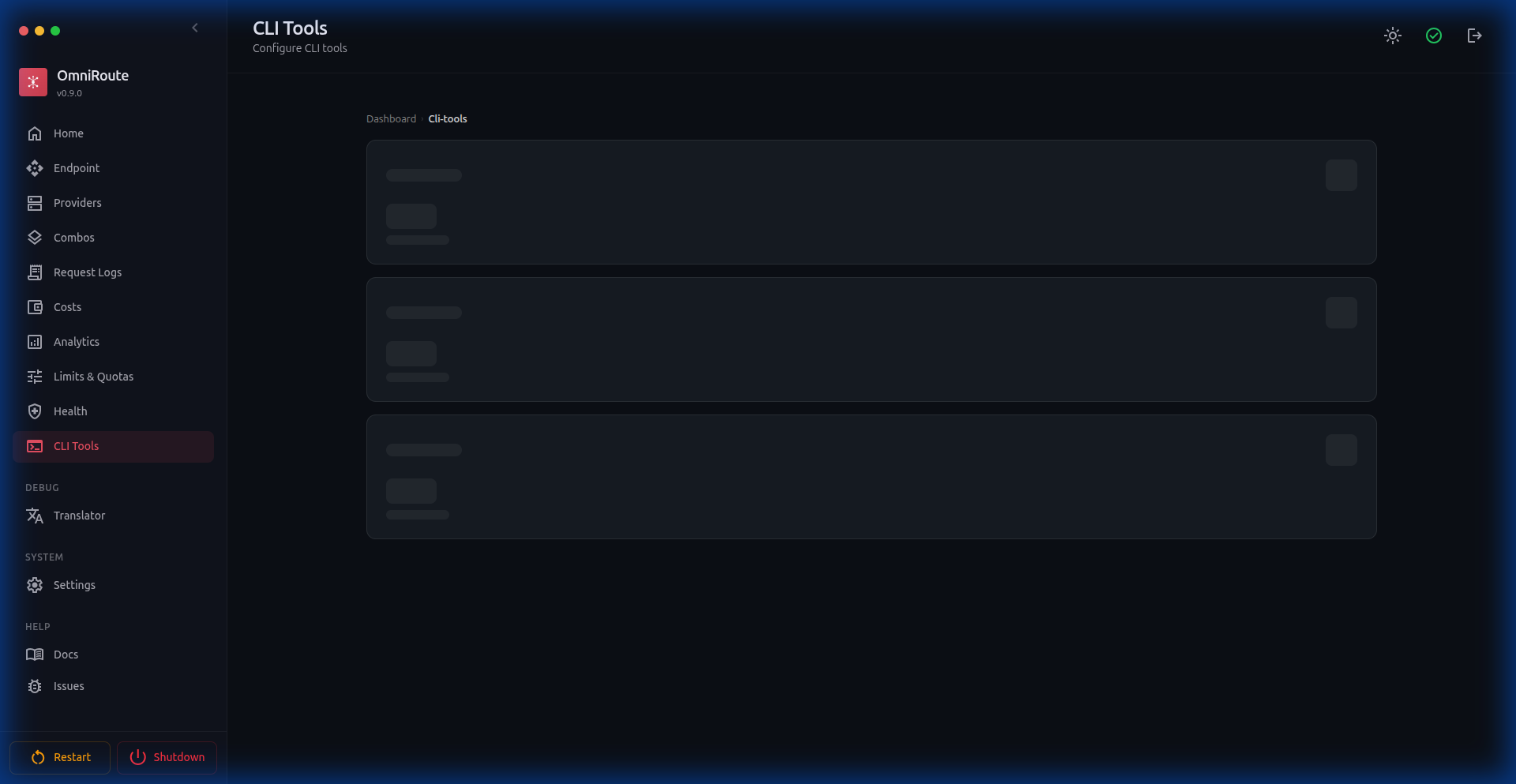
Section titled “🔧 CLI Tools”One-click configuration for AI coding tools: Claude Code, Codex CLI, OpenClaw, Kilo Code, Antigravity, Cline, Continue, Cursor, and Factory Droid. Features automated config apply/reset, connection profiles, and model mapping.
🤖 CLI Agents (v2.0.11+)
Section titled “🤖 CLI Agents (v2.0.11+)”Dashboard for discovering and managing CLI agents. Shows a grid of 16 built-in agents (Codex, Claude, Goose, OpenClaw, Aider, OpenCode, Cline, ForgeCode, Amazon Q, Open Interpreter, Cursor CLI, Warp, Windsurf, Devin CLI, Kimi Coding, Command Code) with:
- Installation status — Installed / Not Found with version detection
- Protocol badges — stdio, HTTP, etc.
- Custom agents — Register any CLI tool via form (name, binary, version command, spawn args)
- CLI Fingerprint Matching — Per-provider toggle to match native CLI request signatures, reducing ban risk while preserving proxy IP
- Local Devin authentication — Devin CLI uses
devin auth login; no browser OAuth flow is required
🔗 Context Relay (v3.5.5+)
Section titled “🔗 Context Relay (v3.5.5+)”A combo strategy that preserves session continuity when account rotation happens mid-conversation. Before the active account is exhausted, OmniRoute generates a structured handoff summary in the background. After the next request resolves to a different account, the summary is injected as a system message so the new account continues with full context.
Configurable via combo-level or global settings:
- Handoff Threshold — Quota usage percentage that triggers summary generation (default 85%)
- Max Messages For Summary — How much recent history to condense
- Summary Model — Optional override model for generating the handoff summary
Currently supports Codex account rotation. See Context Relay documentation.
🗜️ Prompt Compression (v3.7.9+)
Section titled “🗜️ Prompt Compression (v3.7.9+)”Context & Cache now exposes dedicated pages for Caveman, RTK, and Compression Combos:
- Caveman — language-aware rule packs, preview, output-mode controls, and analytics
- RTK — command-aware compression for shell, git, test, build, package, Docker, infra, JSON, and stack-trace output
- Compression Combos — named pipelines such as
rtk -> cavemanassigned to routing combos; the default stacked math reaches~89%average and78-95%eligible-context savings when both engines apply - Raw-output recovery — optional redacted RTK raw-output pointers for debugging compressed failures
See Compression Guide, RTK Compression, and Compression Engines.
🛡️ Proxy Hardening (v3.5.5+)
Section titled “🛡️ Proxy Hardening (v3.5.5+)”Comprehensive proxy configuration enforcement across the entire request pipeline:
- Token Health Check — Background OAuth refresh now resolves proxy config per connection, preventing failures in proxy-required environments
- API Key Validation — Provider key validation (
POST /api/providers/validate) routes throughrunWithProxyContext, honoring provider-level and global proxy settings - undici Dispatcher Fix — Proxy dispatchers use undici’s own fetch implementation instead of Node’s built-in fetch, resolving
invalid onRequestStart methoderrors on Node.js 22 - Node.js Version Detection — Login page proactively detects incompatible Node.js versions (24+) and displays a warning banner with instructions to use Node 22 LTS
📧 Email Privacy Masking (v3.5.6+)
Section titled “📧 Email Privacy Masking (v3.5.6+)”OAuth account emails are masked by default (e.g. di*****@g****.com) to prevent accidental exposure when sharing screenshots or recording demos. Use Settings → Appearance → Account email visibility to reveal or mask full account emails globally across providers, combos, logs, quota, and playground screens.
👁️ Model Visibility Toggle (v3.5.6+)
Section titled “👁️ Model Visibility Toggle (v3.5.6+)”The provider page model list now includes:
- Real-time search/filter bar — Quickly find specific models
- Per-model visibility toggle (👁 icon) — Hidden models are grayed out and excluded from the
/v1/modelscatalog - Active-count badge (
N/M active) — Shows at a glance how many models are enabled vs total
🔧 OAuth Env Repair (v3.6.1+)
Section titled “🔧 OAuth Env Repair (v3.6.1+)”One-click “Repair env” action for OAuth providers that restores missing environment variables and fixes broken auth state. Accessible from Dashboard → Providers → [OAuth Provider] → Repair env. Automatically detects and repairs:
- Missing OAuth client credentials
- Corrupted env file entries
- Backup path sanitization
🗑️ Uninstall / Full Uninstall (v3.6.2+)
Section titled “🗑️ Uninstall / Full Uninstall (v3.6.2+)”Clean removal scripts for all installation methods:
| Command | Action |
|---|---|
npm run uninstall |
Removes the system app but keeps your DB and configurations in ~/.omniroute. |
npm run uninstall:full |
Removes the app AND permanently erases all configurations, keys, and databases. |
🖼️ Media (v2.0.3+)
Section titled “🖼️ Media (v2.0.3+)”Generate images, videos, and music from the dashboard. Supports OpenAI, xAI, Together, Hyperbolic, SD WebUI, ComfyUI, AnimateDiff, Stable Audio Open, and MusicGen.
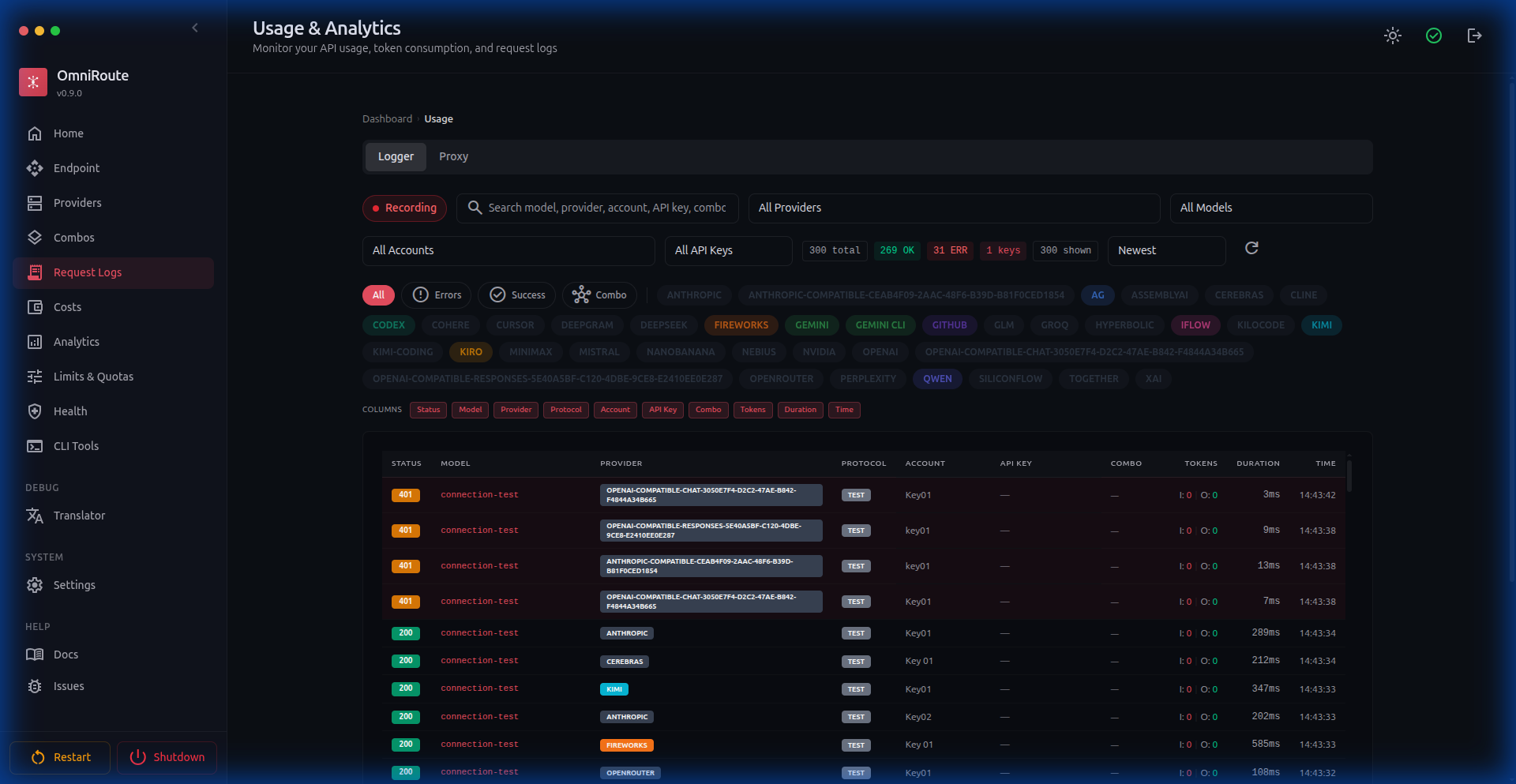
📝 Request Logs
Section titled “📝 Request Logs”Real-time request logging with filtering by provider, model, account, and API key. Shows status codes, token usage, latency, and response details.
🌐 API Endpoint
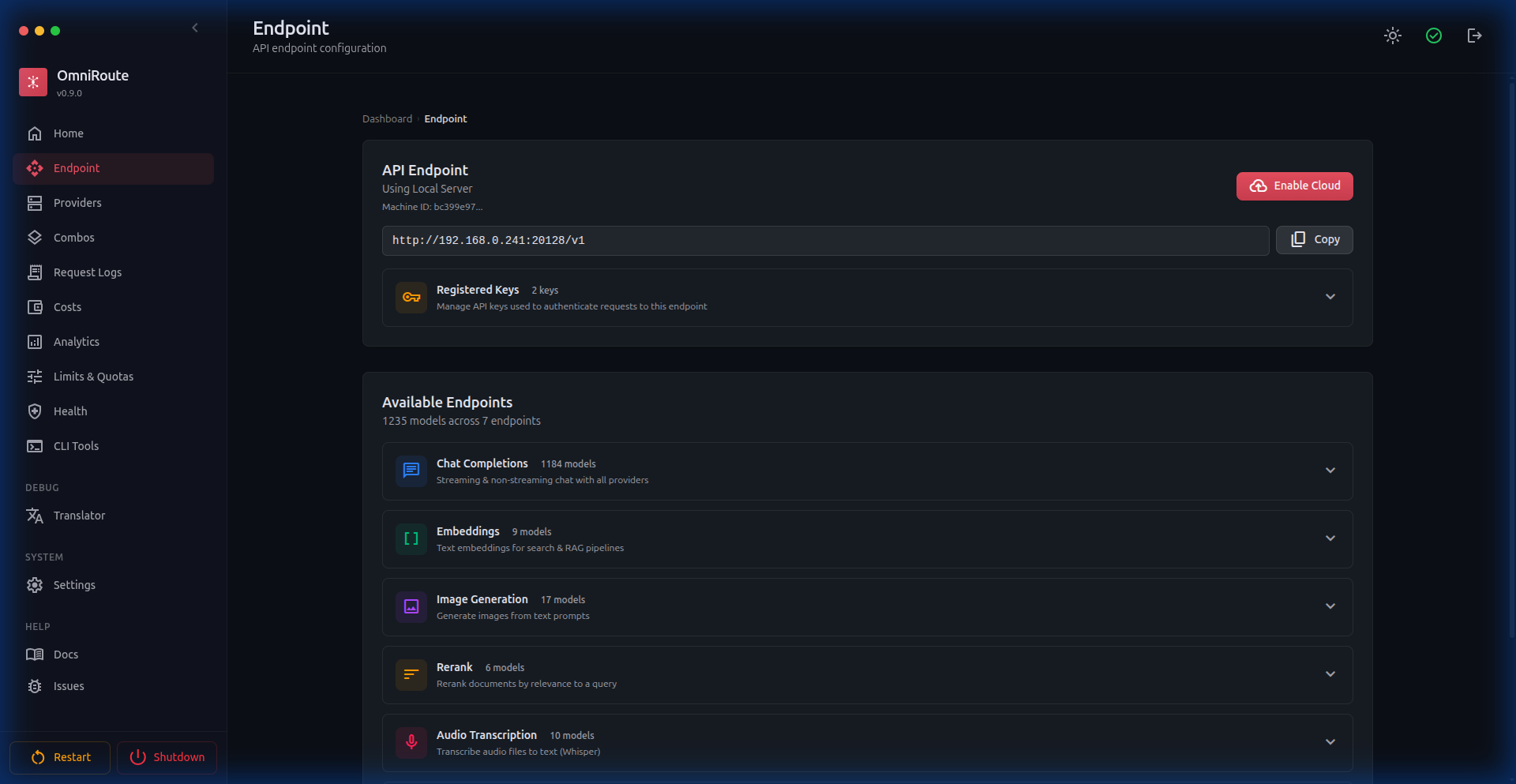
Section titled “🌐 API Endpoint”Your unified API endpoint with capability breakdown: Chat Completions, Responses API, Embeddings, Image Generation, Reranking, Audio Transcription, Text-to-Speech, Moderations, and registered API keys. Cloudflare Quick Tunnel, Tailscale Funnel, ngrok Tunnel, and cloud proxy support are available for remote access.
🔑 API Key Management
Section titled “🔑 API Key Management”Create, scope, and revoke API keys. Each key can be restricted to specific models/providers with full access or read-only permissions. Visual key management with usage tracking.
📋 Audit Log
Section titled “📋 Audit Log”Administrative action tracking with filtering by action type, actor, target, IP address, and timestamp. Full security event history.
🖥️ Desktop Application
Section titled “🖥️ Desktop Application”Native Electron desktop app for Windows, macOS, and Linux. Run OmniRoute as a standalone application with system tray integration, offline support, auto-update, and one-click install.
Key features:
- Server readiness polling (no blank screen on cold start)
- System tray with port management
- Content Security Policy
- Single-instance lock
- Auto-update on restart
- Platform-conditional UI (macOS traffic lights, Windows/Linux default titlebar)
- Hardened Electron build packaging — symlinked
node_modulesin the standalone bundle is detected and rejected before packaging, preventing runtime dependency on the build machine (v2.5.5+) - Graceful shutdown — Electron
before-quitshuts down Next.js cleanly, preventing SQLite WAL database locks (v3.6.2+)
📖 See electron/README.md for full documentation.
🌐 V1 WebSocket Bridge (v3.6.6+)
Section titled “🌐 V1 WebSocket Bridge (v3.6.6+)”OmniRoute now supports OpenAI-compatible WebSocket clients via the /v1/ws upgrade endpoint. The custom scripts/dev/v1-ws-bridge.mjs server wraps Next.js and upgrades WS connections to full bidirectional streaming sessions. Authentication uses the same API key or session cookie as HTTP requests.
Key behaviours:
- WS upgrade validated by
src/lib/ws/handshake.tsbefore the connection is established - Streams terminated cleanly on session close or upstream error
- Works alongside the existing HTTP+SSE streaming path simultaneously
🔑 Sync Tokens & Config Bundle (v3.6.6+)
Section titled “🔑 Sync Tokens & Config Bundle (v3.6.6+)”Multi-device and external operator access is now possible via scoped sync tokens:
POST /api/sync/tokens— Issue a new sync token (scoped, with optional expiry)DELETE /api/sync/tokens/:id— Revoke a tokenGET /api/sync/bundle— Download a versioned, ETag-keyed JSON snapshot of all non-sensitive settings (passwords redacted)
The config bundle is built by src/lib/sync/bundle.ts. Consumers compare the ETag response header to detect changes without re-downloading the full payload.
🧠 GLM Thinking Preset (v3.6.6+)
Section titled “🧠 GLM Thinking Preset (v3.6.6+)”GLM Thinking (glmt) is now a registered first-class provider: 65 536 max output tokens, 24 576 thinking budget, 900 s default timeout, Claude-compatible API format, and shared usage sync with the GLM family.
Hybrid token counting also lands in v3.6.6: when a Claude-compatible provider exposes /messages/count_tokens, OmniRoute calls it before large requests with graceful estimation fallback.
🛡️ Safe Outbound Fetch & SSRF Guard (v3.6.6+)
Section titled “🛡️ Safe Outbound Fetch & SSRF Guard (v3.6.6+)”All provider validation and model discovery calls now go through a two-layer outbound guard:
- URL guard (
src/shared/network/outboundUrlGuard.ts) — Blocks private/loopback/link-local IP ranges before the socket is opened. - Safe fetch wrapper (
src/shared/network/safeOutboundFetch.ts) — Applies the URL guard, normalises timeouts, and retries transient errors with exponential backoff.
Guard violations surface as HTTP 422 (URL_GUARD_BLOCKED) and are written to the compliance audit log via providerAudit.ts.
🔄 Cooldown-Aware Retries (v3.6.6+)
Section titled “🔄 Cooldown-Aware Retries (v3.6.6+)”Chat requests now automatically retry when an upstream provider returns a model-scoped cooldown. Configurable via REQUEST_RETRY (default: 2) and MAX_RETRY_INTERVAL_SEC (default: 30 s). Rate-limit header learning improved across x-ratelimit-reset-requests, x-ratelimit-reset-tokens, and Retry-After — per-model cooldown state is visible in the Resilience dashboard.
📋 Compliance Audit v2 (v3.6.6+)
Section titled “📋 Compliance Audit v2 (v3.6.6+)”The audit log has been expanded with cursor-based pagination, request context enrichment (request ID, user agent, IP), structured auth events, provider CRUD events with diff context, and SSRF-blocked validation logging. New events emitted by src/lib/compliance/providerAudit.ts.
HagiCode
HagiCode is an agentic coding workspace. Rich, convenient UI interactions make planning, agent execution, and project work approachable and easy to navigate, creating an engaging development experience.
Explore an engaging development experience through rich, convenient UI interactions.

- SmartOpenSpec workflows turn intent into an executable path, from proposal to design, tasks, and a shipped change.
- EfficientMulti-agent execution keeps research, implementation, and review moving in parallel, across several repositories and the Agent CLIs you already use.
- InterestingRich, convenient UI interactions make planning, agent execution, and project work approachable and easy to navigate.
Download for Windows
Share HagiCode

Turn ideas into shipped software.
HagiCode is an agentic coding workspace. OpenSpec workflows plan the change, multi-agent execution carries it out, and Hero Scenario makes the long run visible, so ideas become shipped software.
- Smart
- OpenSpec workflows turn intent into a path from proposal to shipped change.
- Efficient
- Multi-agent execution runs research, build, and review in parallel.
- Fun
- Rich UI interactions make planning, agent work, and projects easier to follow.
© 2026 HagiCode | Powered By hagilight-starlight@0.21.0 | Branch: main | Commit: de60bcd | Built: